
- Do not register the remote machine in the client machine before registering the client machine in the remote machine. Otherwise, registering the remote machine fails.

- Before starting this procedure, connect the network cable to the target machine(s), and then configure the network settings.
- On the remote machine, press the [User Tools] icon on the operation panel.
- Press [Machine Features].
- Press [System Settings].
- Press [Administrator Tools].
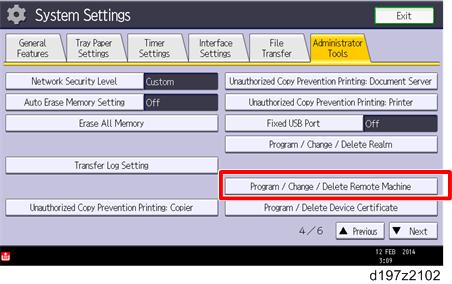
- Press [Program/Change/Delete Remote Machine].
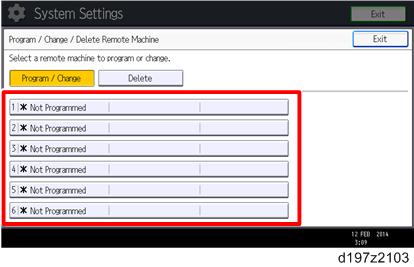
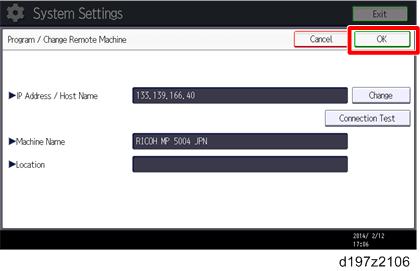
- Press [* Not Programmed], and then enter the IP address or host name of one of the client machines.
- Up to six machines can be registered as the client machines.
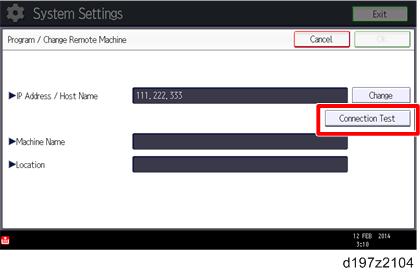
- Press [Connection Test] to check the connection with the client machine.
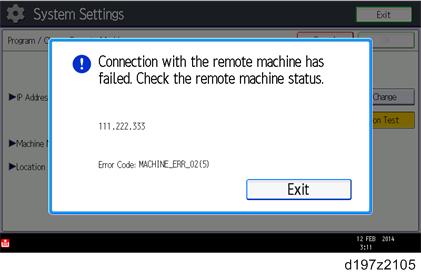
- If an error message is displayed, check the network connection with the client- machine and make sure that the IP address of the client machine is correct.
- Press [OK] after "Connection Test" has been successfully done.
- Press [Exit].